Base POS Station
$29.99 Per station, per monthStandard advertised monthly service price for eligible base POS stations.
Additional processing, equipment, and service charges may apply.
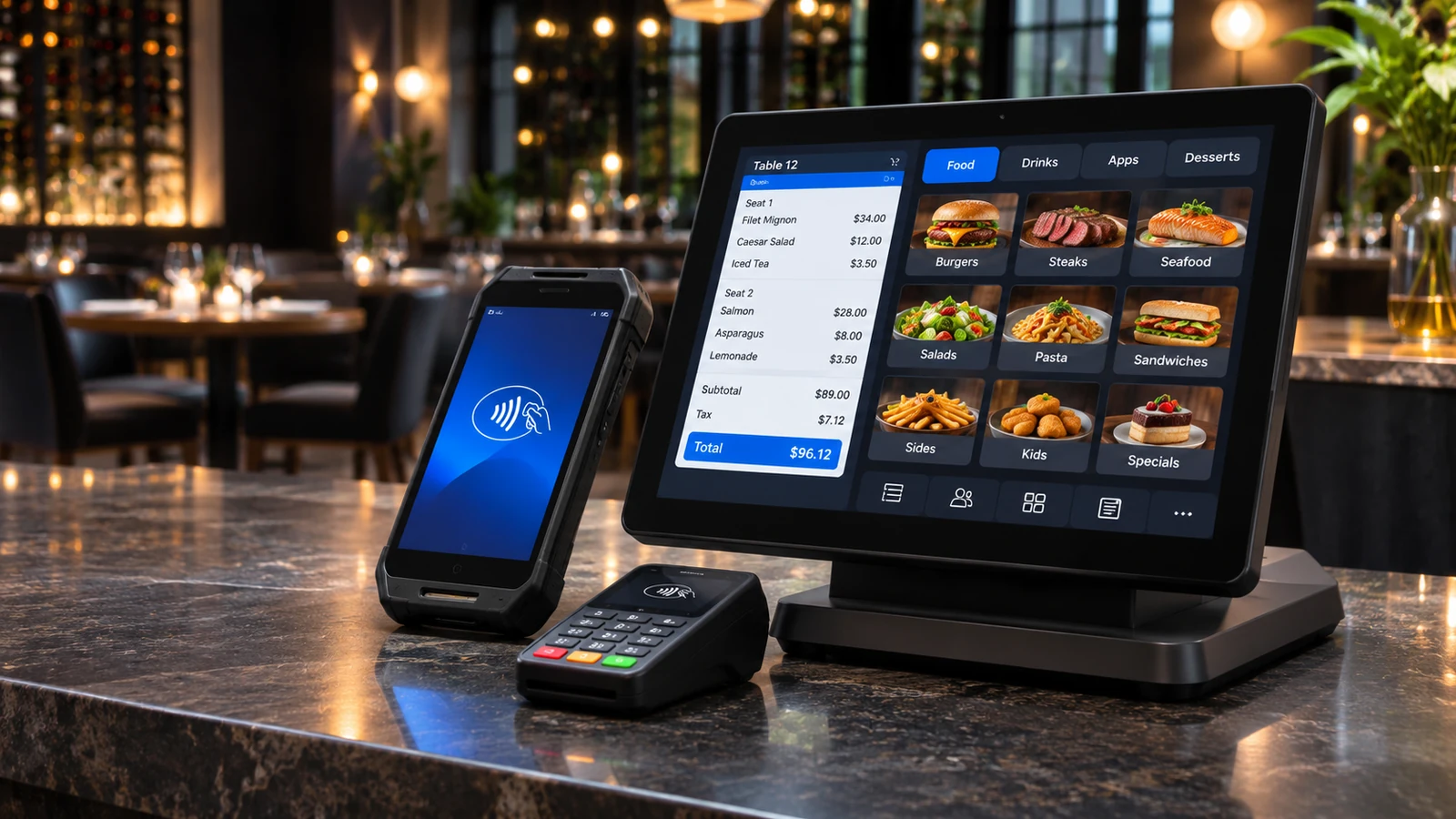
SkyTab POS, now known as Shift4 Dine, is an integrated restaurant point-of-sale system for managing orders, payments, and daily operations. Through Valued Merchant Services, restaurants can explore eligible hardware, restaurant software, and Shift4 processing with personal guidance from a VMS representative.
Qualifying SkyTab POS offers include no upfront hardware cost, installation included, and a standard base station service price of $29.99 per month.
In addition, a qualifying Cash Discount Advantage promotion may offer $0 monthly base station service fees for the first year. Terms and additional charges apply.
SkyTab POS requires Shift4 processing. Promotional eligibility, hardware, installation, fees, and commitments depend on applicable written agreements.
Compare the standard POS service price with the first-year promotional option. Both require reviewing the complete agreement.
Standard advertised monthly service price for eligible base POS stations.
Additional processing, equipment, and service charges may apply.
Promotional base POS service pricing for qualifying Cash Discount Advantage merchants.
Later monthly fees and other charges may apply.
Eligible offers include specified hardware and installation.
Service commitments, equipment conditions, and processing requirements apply.
Important: These advertised figures do not represent the complete cost of processing payments. Additional devices, software, account fees, processing charges, and contractual obligations may apply.
See an introduction to the restaurant POS experience, including the types of payment and ordering workflows merchants can explore.
Because SkyTab POS is now branded Shift4 Dine, request a current demonstration before deciding on hardware or software features.
SkyTab POS video demonstration. Current product names, device options, software screens, and pricing may differ.
Want a walkthrough based on your restaurant? VMS can help you review current equipment, order entry, tableside payments, kitchen workflows, and available offers.
SkyTab POS was officially rebranded Shift4 Dine in May 2026. The new name continues the restaurant technology platform within the Shift4 ecosystem.
Existing restaurant merchants did not need to replace their systems solely because of the rebrand.
However, current hardware, software features, product names, and promotional offers should be confirmed before making a new purchasing decision.
For clarity, this page uses both names when discussing the restaurant POS platform.
SkyTab restaurant POS tools are designed to connect ordering, guest payments, kitchen communication, and management functions.
Specific capabilities depend on the equipment, software, and services included in the approved configuration.
Configure supported menus, modifiers, tickets, and restaurant payment workflows.
Ask to see the complete ordering process from item selection through checkout.
Eligible portable devices support tableside ordering and payment acceptance.
Review tip entry, check splitting, connectivity, and device fees.
Compatible kitchen displays can help restaurant staff manage incoming orders and preparation.
Confirm routing rules, station placement, and monthly charges.
Supported online ordering tools can connect digital orders with restaurant operations.
Compare pickup, delivery integration, menu synchronization, and applicable fees.
Eligible QR-based experiences may allow customers to access supported ordering and payment workflows.
Verify the features available in your proposed plan.
Available tools can help restaurants coordinate reservations, guest arrivals, and seating.
Confirm included functions and any associated subscription fees.
Explore eligible loyalty, customer engagement, and marketing features.
Premium options and messaging charges may apply.
Review sales, transactions, and available operational reports.
Ask about exports, user permissions, and multi-location reporting.
Explore eligible employee permissions, timekeeping, inventory tools, and available integrations.
Some features require additional modules or services.
The right configuration depends on your service model, kitchen workflow, payment locations, and staff requirements.
Table-service restaurants may need floor plans, ticket management, check splitting, handheld ordering, and tableside payments.
During a demo, follow one order from the server to the kitchen and finally through payment.
Counter-service operations often prioritize speed, menu modifiers, kitchen routing, and pickup coordination.
Compare the needs of cashiers, kitchen staff, and customers at peak volume.
Bar operations may need open tabs, rapid item entry, tipping, check transfers, and shift reporting.
Ask how the selected configuration handles authorization, tabs, and employee permissions.
Coffee shops and fast-casual locations may benefit from compact checkout, modifiers, digital ordering, and loyalty tools.
Consider countertop space, receipt workflows, and kitchen connections.
The platform supports eligible hardware configurations for restaurant checkout, portable ordering, kitchen operations, and customer payments.
A primary workstation supports restaurant order entry, checkout, and related functions.
Qualifying packages may include compatible peripherals such as a cash drawer, printer, and card reader.
Portable equipment can support eligible tableside ordering and payment acceptance.
Additional device and monthly service charges may apply.
Historical VMS equipment materials describe SkyTab Glass as an option for tableside workflows.
Confirm current availability and replacement devices before selecting equipment.
Eligible displays help kitchen teams manage incoming orders and preparation.
Review device quantities, routing requirements, and separate fees.
Supported configurations may include customer displays for order confirmation and payment interactions.
Verify hardware compatibility and recurring charges.
Certain restaurant operations may benefit from eligible self-service ordering solutions.
Ask about equipment availability, setup requirements, software, and service costs.
Hardware note: Equipment shown in older SkyTab materials may not represent the current Shift4 Dine lineup. VMS will help confirm available devices and specifications before enrollment.
The advertised monthly POS service fee is only one part of the complete merchant agreement. Restaurant owners should compare the full cost of processing, hardware, and software before making a decision.
| Offer | Advertised Price | Important Conditions |
|---|---|---|
| Standard SkyTab POS Service | $29.99 per month per base station | Qualifying equipment, Shift4 processing, applicable agreements, and additional fees |
| Cash Discount Advantage Promotion | $0 monthly base station service fee for the first 12 months | Promotional eligibility, approved processing program, post-promotion pricing, and contract obligations |
| Additional Equipment | Quoted separately where applicable | Handhelds, kitchen displays, peripherals, kiosks, and optional devices |
| Payment Processing | Based on approved processing terms | Transaction fees, account charges, applicable program requirements, and taxes |
Under qualifying offers, restaurants may receive specified POS equipment without paying a purchase price upfront.
However, free upfront hardware does not mean the equipment is unrestricted or free of contractual obligations.
Processing requirements, equipment conditions, termination provisions, and possible return obligations must be reviewed in the final written documents.
VMS's qualifying Cash Discount Advantage offer includes a $0 monthly base POS station service fee for the first year.
After the promotional period, monthly station charges may apply. Processing charges and optional equipment fees may still apply during the promotional period.
Therefore, request a quote that clearly identifies first-year costs, later recurring fees, and the full service commitment.
The current VMS partner-program information describes a three-year service agreement.
However, certain previously published POS forms refer to other initial periods, including a 12-month term.
The actual agreement length, renewals, equipment obligations, and termination provisions are governed by the final signed documents.
Pricing transparency: VMS recommends reviewing the complete processing and POS proposal before signing. Ask for every recurring charge, optional feature, equipment obligation, and promotional expiration date in writing.
A complete restaurant POS quote should explain all applicable equipment, payment processing, software, and service charges.
Extra handhelds, kitchen displays, printers, tablets, customer displays, and other peripherals may carry separate charges.
Verify each device in the equipment order.
POS service fees and payment processing fees are separate.
Review transaction charges, account fees, and applicable processing program requirements.
Some advanced features, modules, integrations, or third-party services may involve additional costs.
Ask which functions are included in the quoted package.
Carefully review renewal rules, equipment ownership, return conditions, and possible termination charges.
The signed agreement controls these obligations.
SkyTab POS, now Shift4 Dine, is offered through VMS as an integrated Shift4 processing solution.
SkyTab POS must be used with Shift4 payment processing.
It should not be treated as an open POS system that can operate with any unrelated credit card processor.
If your restaurant currently uses another processor, VMS can help you evaluate a potential transition.
On the other hand, if preserving your current processor is essential, we can compare alternative POS systems instead.
Valued Merchant Services has helped businesses evaluate merchant payment technology since 2006.
Our preferred partner relationship allows restaurants to explore eligible SkyTab POS and Shift4 Dine solutions with assistance from a VMS representative.
Rather than selecting a system from a generic equipment list, you can discuss station placement, tableside payments, kitchen routing, and order management with your agent.
In addition, VMS can help explain promotional pricing, agreement requirements, and relevant service options.
Chris Del Grande, President and Co-Founder, established Valued Merchant Services in 2006.
Our philosophy remains people before profits. If SkyTab is not the right solution for your restaurant, we will tell you.
A useful POS demonstration should reflect the way your restaurant actually operates, from ordering through payment.
| Restaurant Need | Request a Demonstration Of | Confirm Before Signing |
|---|---|---|
| Table Service | Opening tables, modifiers, splitting checks, and payments | Handheld capabilities, device fees, and tip workflows |
| Kitchen Communication | Sending orders to the appropriate kitchen station | Display requirements, printers, routing, and extra charges |
| Online Ordering | A digital order reaching the restaurant POS | Delivery options, supported integrations, and fees |
| Reporting | Sales reports and manager dashboard | Permissions, exports, and multi-location features |
| Payment Processing | Card acceptance, tipping, and end-of-day procedures | Processing charges, deposit timing, and account terms |
| Total Cost | The complete written equipment and fee quote | Agreement term, post-promotion pricing, and termination conditions |
Review your restaurant workflow, equipment needs, payment processing costs, and agreement requirements before completing an application.
Tell VMS about your service model, locations, current POS, and number of stations.
Explore ordering, tableside payments, kitchen routing, reporting, and available tools.
Review equipment, processing rates, monthly charges, promotions, and contractual obligations.
After approval and signing, coordinate equipment, installation, and available training resources.
Ready to compare the current offer? Contact VMS for a personalized SkyTab POS proposal and confirmation of current promotional terms.
Request a SkyTab POS quote or call 800-531-8575 .
Answers about equipment, pricing, Shift4 processing, contracts, and working with VMS.
Yes. SkyTab POS was rebranded Shift4 Dine in May 2026. The new name continues the restaurant POS platform within the Shift4 ecosystem.
Yes. Valued Merchant Services offers eligible SkyTab POS and Shift4 Dine solutions through its preferred partner program. Contact VMS for current offers and equipment details.
Qualifying offers provide specified POS hardware without an upfront purchase charge. However, processing, service, and equipment terms apply. Review ownership, return, and termination conditions in the final agreement.
VMS's standard offer lists $29.99 per month per eligible base POS station. Processing, additional equipment, software, taxes, and other fees may apply.
VMS describes a qualifying Cash Discount Advantage promotion offering a $0 monthly base station service charge for the first 12 months. Other fees may still apply, and later station charges depend on the agreement.
Yes. The VMS SkyTab POS offering requires Shift4 payment processing. It is not an open POS system for unrelated processors.
The current VMS program describes a three-year service agreement. However, older documents contain different initial terms. The signed agreements establish the actual service period, renewals, and termination obligations.
Installation is included under qualifying offers. Confirm the installation scope, location eligibility, network requirements, and any additional labor charges in your proposal.
Yes. Eligible hardware supports portable ordering and tableside payment workflows. Available devices, features, and monthly charges depend on the configuration.
Supported configurations include online ordering capabilities. Confirm current integration options, delivery connections, and applicable payment fees.
Yes. Eligible kitchen display options support restaurant ticket and preparation workflows. Additional equipment and service fees may apply.
SkyTab has offered loyalty and marketing features under qualifying configurations. Confirm which services are currently included and whether optional charges apply.
Shift4 operates the POS platform and official technical support services. Your VMS representative can provide additional relationship-based guidance and help direct you to appropriate resources.
VMS can help compare your current system with the SkyTab offering. Before switching, review existing contracts, processor compatibility, data migration, training, and complete costs.
Visit the VMS contact page , call 800-531-8575 , or email support@valuedmerchants.com . Tell us your restaurant type, number of stations, and desired features.
Review these VMS-hosted resources for additional background on SkyTab equipment, restaurant features, and service agreements.
Some documents predate the Shift4 Dine rebrand and should not be treated as current promotional offers.
Explore historical restaurant POS functionality, tableside payments, kitchen workflows, and reporting.
Review additional product information from the VMS SkyTab resource library.
Review the April 2025 agreement document for historical equipment and service terms.
Final current agreement terms must be confirmed separately.
Review the VMS-hosted addendum relating to eligible portable payment arrangements.
Application documents: Request the current merchant application, processing agreement, POS service agreement, equipment order, and any relevant promotion addenda from your VMS representative before signing.
Explore restaurant POS technology, qualifying no-upfront-cost equipment offers, and personal merchant services assistance through VMS.
We'll help review the number of POS stations you need, payment processing requirements, promotional offers, and complete service costs.
Shift4 processing is required. Eligibility, equipment, installation, promotional terms, monthly service fees, and additional charges depend on applicable agreements.
If SkyTab is not the best match, VMS can help you compare other POS and payment technology options.