Virtual Terminal
Authorized staff can enter supported transactions through a secure browser-based payment interface.
Ask about user permissions, transaction receipts, refunds, and payment security.
The VMS Connect demo introduces the NMI-powered payment gateway and virtual terminal available through Valued Merchant Services. See the dashboard, explore payment management tools, and learn how eligible merchants can accept card payments, manage invoices, and configure recurring billing.
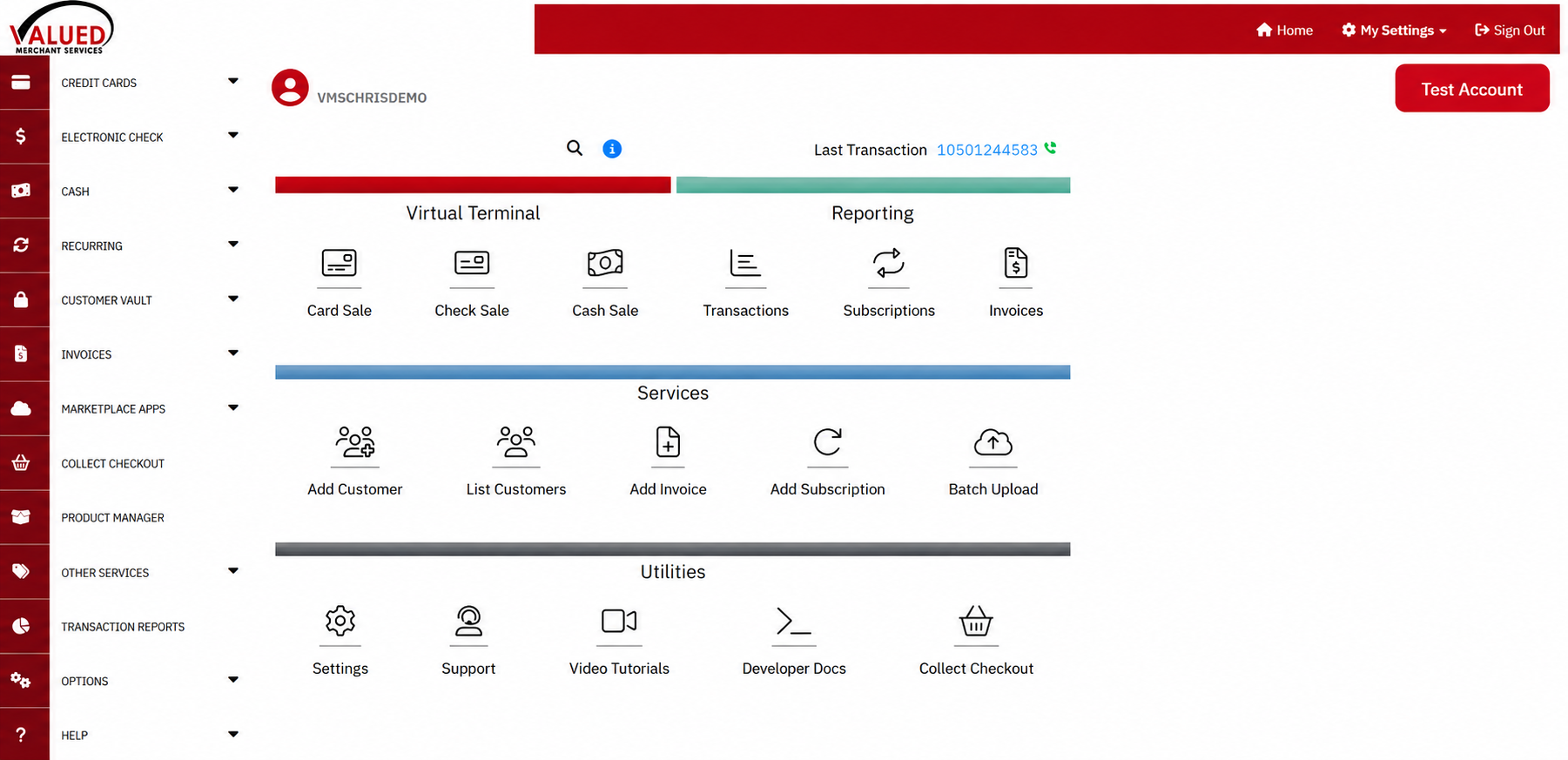
Begin with an actual screenshot of the VMS Connect demo account. Then watch our recorded demonstration and request a current personalized walkthrough to explore the tools that fit your business.
VMS Connect is a VMS-branded NMI gateway offering. Available functions, payment types, processing, integrations, and fees depend on the merchant's approved account configuration.
This screenshot shows the VMS Connect demo account after login. The dashboard provides navigation for payment transactions, reporting, customer management, and other supported services.
The recorded demonstration provides additional context about the virtual terminal and payment gateway workflow. For current functionality, ask VMS for a personalized demo.
About this recording: This original VMS Connect demonstration was published in February 2017. The current dashboard, interface, software features, and supported integrations may differ from the recording. A personalized walkthrough is the best way to evaluate the current platform.
VMS Connect is Valued Merchant Services' NMI-powered payment gateway and virtual terminal offering.
A virtual terminal is a browser-based interface that allows authorized users to process and manage supported transactions. It can be helpful for businesses accepting phone payments, remote invoices, and other card-not-present transactions.
A payment gateway can also connect approved merchant accounts to compatible ecommerce, recurring billing, and other payment applications.
However, a gateway is not itself a merchant processing account. An approved processor, account configuration, and supported integrations are required.
VMS can help you determine which services your business actually needs.
These are relevant features to review during a current VMS Connect demonstration. Their availability depends on the merchant's enabled services and supported processor configuration.
Authorized staff can enter supported transactions through a secure browser-based payment interface.
Ask about user permissions, transaction receipts, refunds, and payment security.
Eligible checkout options help customers submit online payments through supported payment pages.
Confirm website compatibility, branding, setup requirements, and associated costs.
Enabled recurring billing services can support authorized repeat charges.
Review customer consent, billing schedules, failed transactions, and cancellation procedures.
Tokenized payment credentials can support eligible future authorized transactions.
Confirm storage controls and applicable PCI DSS responsibilities.
NMI provides developer tools and supported integration methods.
Check the exact website, shopping platform, application, and development requirements.
Supported transaction tools can help authorized users review activity, reporting, and payment records.
Ask which reports and exports are available for your configuration.
Approved ACH or eCheck services may be available with separate authorization and processing requirements.
Verify fees, returns, settlement, and eligibility.
Compatible tools can support merchant invoicing and remote payment collection workflows.
Review invoice delivery, payment methods, and accounting integration.
Available controls may help merchants screen transactions and manage certain payment risks.
These tools do not eliminate fraud or guarantee against chargebacks.
Feature availability: Current services, transaction methods, processors, user permissions, software fees, and integrations must be confirmed for each merchant.
VMS Connect may be worth considering when payment acceptance extends beyond a traditional countertop card terminal.
Law firms, consultants, and other service providers may need remote card payments, invoices, and transaction management.
Evaluate secure keyed transactions, permissions, and accounting integration.
Businesses may need to request deposits, send invoices, or collect payments after completing work.
Compare supported payment requests, invoice workflows, and integration options.
Online merchants may need hosted checkout, gateway connections, fraud screening, and recurring billing.
Review compatibility with the existing website and payment processor.
Eligible businesses may use recurring payment services for approved billing arrangements.
Confirm customer authorization, payment credentials, cancellation handling, and fees.
A demonstration should answer questions about your actual payment requirements, not simply walk through every menu.
| Your Need | What to Demonstrate | What to Confirm |
|---|---|---|
| Phone payments | Virtual terminal transaction and receipt | Security procedures, permissions, and fees |
| Invoices | Creating and sending a payment request | Available payment methods and invoice charges |
| Recurring charges | Creating and managing a subscription | Consent, billing rules, and cancellation |
| Website checkout | Hosted checkout or supported integration | Software compatibility and developer needs |
| ACH | Bank-payment workflow if enabled | Approval, authorizations, returns, and settlement |
| Multiple employees | User permissions and reporting | Role restrictions and account access |
A payment gateway's total cost can include more than a base monthly fee.
Depending on the configuration, merchants may have gateway fees, card processing charges, ACH-related costs, recurring billing fees, and optional software expenses.
Website development, supported card readers, and outside integrations can also involve additional costs.
Moreover, gateway functionality requires a compatible merchant account and approved services.
VMS can help compare the required components and identify potential compatibility concerns before activation.
First explore the dashboard and video. Then request a walkthrough based on your needs.
Review the screenshot and recorded video, then identify the functions you want to learn about.
Share your payment methods, software, and integration requirements with VMS.
Compare current platform capabilities, approved processing, pricing, and implementation needs.
The dashboard preview and recorded video provide a starting point. However, a current demonstration can show how VMS Connect may work for your business today.
Tell us whether you need phone payments, invoicing, website checkout, recurring billing, ACH, or integrations.
We can discuss gateway capabilities, compatible merchant processing, software requirements, and current pricing.
Valued Merchant Services helps businesses nationwide evaluate payment gateways, merchant accounts, POS systems, and related payment technology.
Chris Del Grande, President and Co-Founder, has worked with merchants on payment solutions since founding VMS in 2006.
Our philosophy is people before profits. We believe payment technology should solve a business problem, not introduce unnecessary cost.
If your current gateway is working well and switching doesn't make sense, we'll tell you.
Answers about the demo dashboard, gateway features, compatibility, and requesting a walkthrough.
VMS Connect is an NMI-powered payment gateway and virtual terminal offering available through Valued Merchant Services. Supported capabilities depend on the enabled account and processing relationship.
Yes. You can view the dashboard screenshot and watch the recorded demonstration on this page without opening a merchant account.
The screenshot shows the demo account's main dashboard, including menus for card sales, check sales, invoices, subscriptions, transaction reporting, customer records, and various utilities. Available services depend on merchant account configuration.
The original recording was published in 2017. It provides an introduction to VMS Connect, but features and interface details may have changed. Request a live walkthrough for current functionality.
Eligible virtual terminal accounts support authorized keyed card transactions. Merchants must use appropriate payment security procedures.
NMI provides recurring payment functionality for supported gateway configurations. Confirm billing tools, account eligibility, consent requirements, and current fees.
ACH or eCheck services may be available through a separately enabled processing arrangement. Bank payments require proper authorization and have distinct settlement and return rules.
NMI supports hosted checkout and compatible integration methods. Actual compatibility depends on the website platform, payment processor, and configuration.
Accounting integrations may be available through compatible third-party tools. The exact QuickBooks edition, integration, supported functions, and fees must be checked before implementation.
The gateway and processing account are separate components. VMS can help eligible merchants review both as part of a complete solution.
Pricing depends on the merchant account, gateway configuration, enabled services, and transaction needs. Additional charges may apply for ACH, recurring billing, integrations, or other features. Request a current written proposal.
Contact VMS through our contact page , call 800-531-8575 , or email support@valuedmerchants.com . Tell us which features and integrations you want to evaluate.
Preview the actual VMS Connect dashboard, watch the recorded demonstration, and explore current payment gateway and virtual terminal capabilities with VMS.
Our team can help you evaluate compatible processing, gateway features, pricing, and integration requirements.
Eligibility, approved processing, integrations, features, gateway fees, and support depend on applicable terms.
Compare merchant processing, ACH, payment equipment, and other related payment services.